
Samsung Food: Meal Planner
SamsungFoodFood & Drink
4.54.09K Reviews
- Version
- 2.55.0
- Installs
- 1.00M
- Age Rating
- Teen
Screenshots


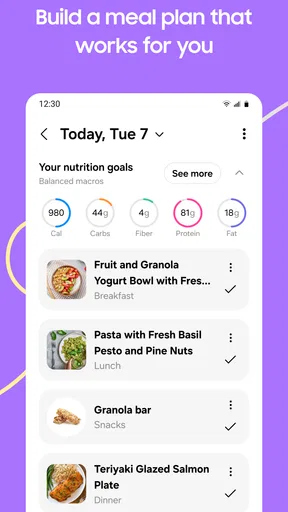
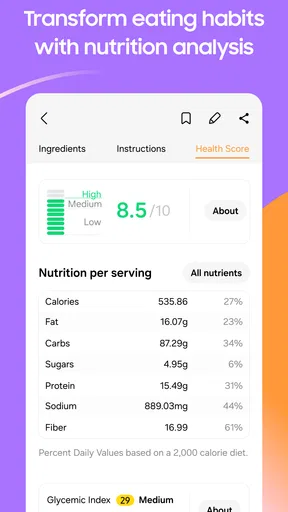
Our Review of Samsung Food: Meal Planner
 Analysis by Appyee
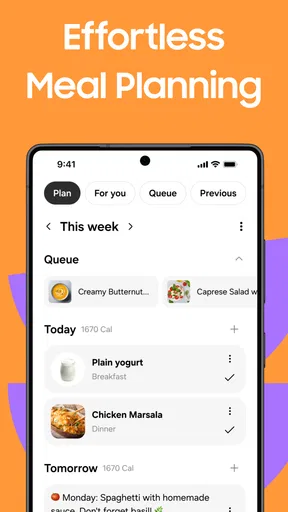
If you’re like me and constantly on the lookout for ways to make meal planning a breeze, you might want to check out the Samsung Food: Meal Planner. It’s like having a culinary assistant right in your pocket, and I’m about to spill all the beans on what makes this app a must-have for foodies and busy bees alike.
When a plan meets a patchy connection
Meal planning is most useful when it can carry an idea from the sofa to the supermarket to the kitchen. In my experience, the key question is not whether an app has a long list of tools, but whether those tools help me make decisions before I’m hungry and in a hurry. Samsung Food brings recipes, meal organization, grocery lists, and nutrition into one place, so I can use it to work out what I intend to cook rather than treating every meal as a fresh search.
That connected approach has a trade-off: recipe discovery and syncing naturally feel most dependable when I have a working connection. I would save or organize recipes while I’m at home, then avoid assuming that every page or change will be available instantly in a basement shop or during a commute. If connectivity is unreliable, a sensible habit is to check the recipes and list before leaving, rather than waiting until I’m standing in an aisle to see whether a saved plan has updated.
That small routine also helps with a common planning snag: recipe pages can contain more detail than I need while shopping. I like to use the app to decide on the meals first, then review the ingredients and make sure the list reflects the whole plan. It is a better handoff than trying to remember ingredients from several browser tabs, but it still rewards a quick check before the trip.
The Ultimate Meal Planning Companion
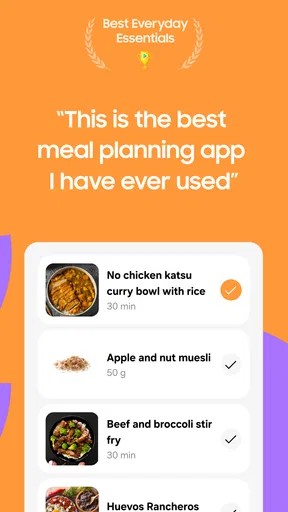
Let’s dive into the nitty-gritty. The Samsung Food: Meal Planner is designed to take the hassle out of meal planning by offering a comprehensive platform where you can organize your meals with ease. It’s not just about jotting down recipes or shopping lists; it’s about crafting a personalized culinary journey.
Using it in the places life actually happens
First off, the app greets you with a clean and intuitive interface. It’s super user-friendly, making it easy for anyone to navigate, whether you’re a tech-savvy millennial or someone who still prefers flip phones (no judgment!).
For me, the most realistic routine is a short planning session at home: choose a few recipes, place them into a workable week, and check the resulting shopping list before heading out. In the shop, the list is more useful than a collection of saved recipes because it turns “I might cook this” into an actionable set of ingredients. At home, the same plan gives me a prompt when I’m tired and tempted to order food without first checking what I meant to make.
The app is a better fit for people who like to gather recipes and make decisions ahead of time than for cooks who improvise every meal from whatever is already in the cupboard. If you already have a reliable routine based on a paper list and a small set of familiar dishes, moving everything into an app may feel like another task rather than a shortcut. I’d try it when planning itself is the part that causes friction, not simply because digital tools seem more modern.
Features to Savor
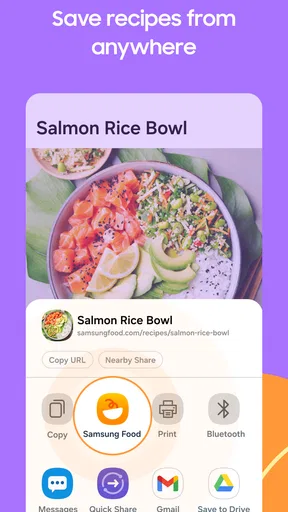
The app is packed with features that make meal planning as simple as pie. One of the standout features is the ability to save your favorite recipes. You can either manually add them or let the app do the magic by importing recipes from your favorite food blogs and websites. This means you can finally get rid of those endless browser tabs you’ve been hoarding!
Recipe importing is especially handy when I find something appealing while browsing, but I would not treat every imported recipe as ready to cook without a glance. Before putting one into a plan, I check that the ingredients and instructions came through in a way that makes sense to me. That quick review is a useful habit when a recipe has several components or relies on an ingredient I do not usually buy. Saving a recipe is the start of a personal collection; deciding whether it fits my kitchen and schedule is still my job.
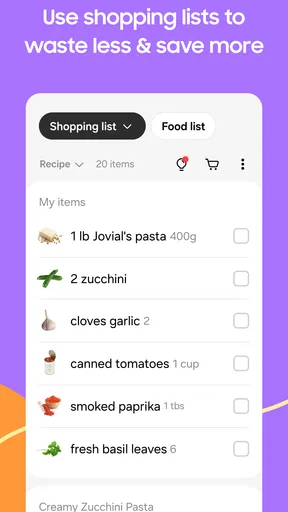
Another nifty feature is the shopping list function. Once you’ve planned your meals, the app automatically generates a shopping list based on the ingredients you need. You can tick off items as you shop, making grocery runs more efficient and less stressful. No more forgetting the cilantro for that homemade guacamole!
One practical way to avoid buying duplicates is to scan the generated list before you leave and compare it with what is already in your kitchen. A planned recipe may call for something you have on hand, while a weekly shop may involve quantities or brands that only you can judge. I find that this check is more valuable than expecting automation to know what is in my fridge. The app can organize the plan, but a quick pantry check is what keeps a tidy list from turning into unnecessary purchases.
Customizable Meal Plans
The app lets you customize your meal plans to fit your lifestyle and dietary needs. Whether you’re vegan, gluten-free, or just trying to cut down on sugar, Samsung Food has got you covered. The app provides suggestions based on your preferences, so you’ll never be stuck in a culinary rut again.
I see dietary preferences as a helpful way to narrow the field, not as a substitute for reading a recipe carefully. If I’m cooking for someone with a strict restriction, I still check each ingredient and any substitutions myself; a preference setting cannot make every recipe suitable for every person. For flexible everyday choices, though, those preferences can reduce the amount of irrelevant browsing and make it easier to find ideas that fit the kind of meals I actually want to cook.
But wait, there’s more! The app also includes a feature for tracking your nutritional intake. It’s like having a dietitian on speed dial. You can monitor your calorie intake and make sure you’re getting all the nutrients you need to stay healthy and energized.
I’d use nutrition tracking as a way to notice patterns or keep an eye on a goal, rather than treating it as a precise verdict on whether a meal is healthy. Logging can take effort, and estimates are only as useful as the details entered. If I wanted detailed medical nutrition guidance, I would rely on a qualified professional; for ordinary meal planning, the tracking tools are better viewed as an optional layer that some people will appreciate and others can ignore.
Keeping plans useful across devices
One of the things I love about this app is its seamless integration with other Samsung devices. If you’re already in the Samsung ecosystem, this app will feel like a natural extension of your digital life. You can sync your meal plans across devices, so whether you’re on your phone, tablet, or smart fridge (yes, that’s a thing), your meal plans are always within reach.
For a phone-first routine, I would keep the screen work brief: collect recipes when I have time, then use the list as a reference while shopping. A larger screen can be more comfortable for reviewing several recipes or thinking through a week, while a phone is convenient for checking one item at a time. People who use Samsung devices may find the connected setup more natural, but I would not choose the app solely for that reason. Its usefulness depends more on whether I want to plan meals and keep recipes together than on owning a particular device.
If a plan does not appear where I expect it, I would first check that the device has a connection and give syncing a moment before rebuilding the plan or entering everything again. That is a small but important recovery habit: repeated edits made in a hurry can create confusion about which version is current. When I know I will be away from a dependable connection, I prefer to review the next meal and shopping needs beforehand, so an unexpected delay does not derail the whole evening.
Personal Experience
I’ve been using the Samsung Food: Meal Planner for a few weeks now, and I must say, it has transformed my cooking game. I used to be that person who would stare blankly into the fridge, but now I have a plan and a purpose. The app has not only saved me time but also money, as I’m no longer buying random ingredients that end up going to waste.
One of my favorite experiences was planning a themed dinner party using the app. I could easily find recipes that fit my theme, organize them, and even share the plan with my friends who were coming over. Talk about a game-changer!
For a smaller everyday version of that workflow, I might plan a couple of weeknight dinners around ingredients that can be used more than once. I would save the recipes, compare their lists, and decide what can be bought in one trip rather than making separate last-minute runs. That approach makes the planner useful beyond special occasions: it helps me coordinate the practical details without demanding that every meal be elaborate.
Who will get the most from it?
Samsung Food is at its strongest for someone who saves recipes from different places, wants a clearer shopping routine, and likes seeing meal ideas gathered together. It can also suit households where one person does the planning and another needs to check what is on the menu or what to buy, especially when both already use compatible Samsung devices. The app is free to download, has a Teen content rating, and includes optional in-app purchases priced from $6.99 to $59.99 per item, so I would check the purchase details before committing to anything beyond the free experience.
It is less compelling if all I need is a bare shopping checklist, since a basic notes app or a paper list may be faster and require less organizing. Likewise, a dedicated nutrition tool may be a better choice for someone whose main goal is detailed dietary monitoring, while a recipe website may be enough for a cook who only wants to look up one dish at a time. Samsung Food’s advantage is the combined workflow; that combination matters only if I will actually use more than one part of it.
The app is developed by SamsungFood and has a 4.6 average from around 22 thousand ratings, with over 1 million installs. It first appeared on December 16, 2019, and version 2.52.1 supports Android 7.0 and later. Those figures suggest a well-established option, but I would still judge it by whether its planning style suits my habits. A popular app cannot remove the small decisions involved in choosing meals, checking ingredients, or keeping a list current.
Final Thoughts
In a world where time is of the essence, the Samsung Food: Meal Planner is a delightful tool that puts the joy back into cooking. Whether you’re a seasoned chef or a novice trying not to burn the toast, this app caters to all and makes meal planning an enjoyable experience.
So, if you find yourself in a culinary conundrum, give the Samsung Food: Meal Planner a whirl. It might just become your new best friend in the kitchen.
My connectivity verdict
My overall take is that Samsung Food is most useful when I treat it as a connected planning workspace, not as a promise that every step will happen without a signal. I’d use it to collect recipes, build a realistic plan, and prepare a checked shopping list before the busy part of the day begins. That keeps the app’s strongest idea—the link between what I want to cook and what I need to buy—at the center, while avoiding unnecessary frustration if a network-dependent moment takes longer than expected.
Verdict
Strengths of Samsung Food: Meal Planner
- User-friendly interface for easy navigation.
- Wide variety of recipes to explore.
- Personalized meal plans for diverse diets.
- Syncs with Samsung Health for tracking.
- High-quality images enhance user experience.
Limitations of Samsung Food: Meal Planner
- Requires Samsung account for full features.
- Limited offline functionality.
- Occasional recipe inaccuracies.
- Ads can be distracting at times.
- Some features locked behind paywall.
Similar Picks in This Category
View All
Rappi: Food Delivery, Grocery
Rappi, Inc - Delivery3.5

McDonald’s: Cupons e Delivery
Arcos Dorados4.3

Swiggy: Food Instamart Dineout
Swiggy4.7

Blinkit: Groceries & more
Blinkit4.8

foodpanda: food & groceries
Foodpanda GmbH a subsidiary of Delivery Hero SE4.0

Zomato: Food Delivery & Dining
Zomato4.7
Frequently Asked Questions
What is Samsung Food: Meal Planner?
Samsung Food: Meal Planner is a comprehensive app designed to help users plan, organize, and manage their meals effectively. It offers personalized meal recommendations, grocery lists, and nutritional insights to make healthy eating more accessible. The app's user-friendly interface allows for easy navigation and customization to suit individual dietary needs.
Is Samsung Food: Meal Planner available for both Android and iOS?
Yes, Samsung Food: Meal Planner is available for download on both Android and iOS platforms. Users can access the app via the Google Play Store for Android devices or the Apple App Store for iOS devices, ensuring a seamless experience regardless of the operating system.
Does Samsung Food: Meal Planner offer personalized meal plans?
Absolutely. Samsung Food: Meal Planner provides personalized meal plans based on your dietary preferences, health goals, and nutritional requirements. Users can input specific dietary restrictions, such as gluten-free or vegan, to receive tailored meal suggestions that align with their lifestyle and health objectives.
Can I use Samsung Food: Meal Planner offline?
Samsung Food: Meal Planner requires an internet connection for initial setup and downloading new recipes or updates. However, once your meal plans and grocery lists are downloaded, you can access them offline, allowing for convenient use in areas with limited connectivity.
How does Samsung Food: Meal Planner help with grocery shopping?
The app simplifies grocery shopping by generating a comprehensive list based on your meal plan. It categorizes items for easy navigation and allows you to check off items as you shop. This feature ensures you buy only what's needed, reducing food waste and saving time and money.
